


August 2026 Updated Aug 22, 2026
A Brief History of Digital Image Formats: From BMP and GIF to WebP and AVIF
A concise journey through the formats that shaped desktop graphics, the early web and today's high-efficiency visual experiences.

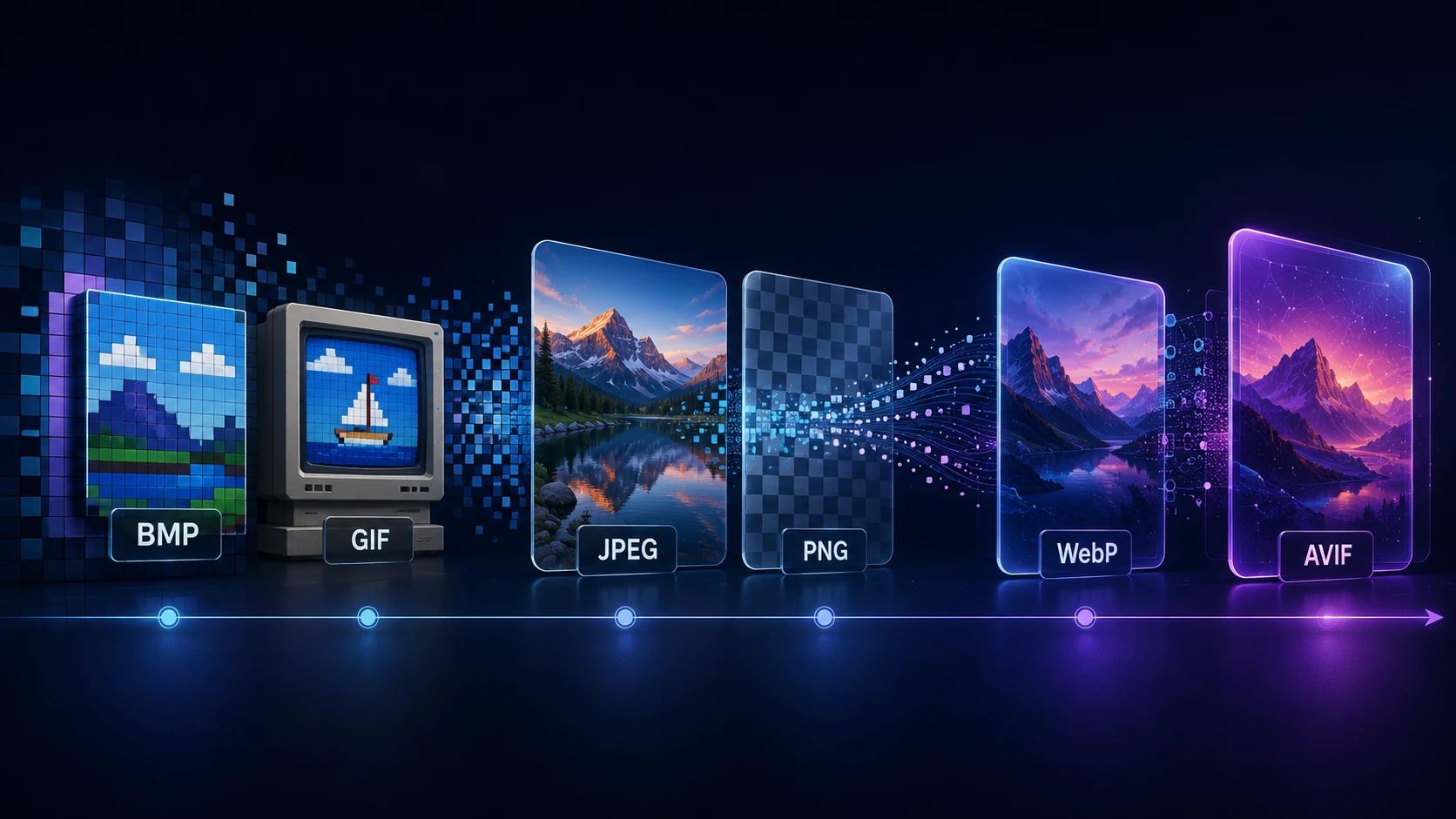
Every digital image format is an answer to a practical problem. BMP made pixel data straightforward for personal computers. GIF helped graphics move through slow online services. JPEG made photographs small enough to store and share. PNG brought lossless compression and better transparency to the web. WebP and AVIF responded to a world in which pages carry more images and must still load quickly on mobile connections.
The history of image formats is therefore not a simple sequence in which each new invention replaces the previous one. Old formats survive because compatibility, editing workflows and predictable behavior can matter as much as compression efficiency. A JPEG created decades ago still opens almost anywhere, while a newer format may offer a smaller file but require more processing or a more modern toolchain.
This brief history follows the major raster formats from early desktop computing to today's web, explaining what each one changed and why it remains relevant.
Digital Image Format Timeline
Period | Format or milestone | What changed |
|---|---|---|
Late 1980s | BMP and device-independent bitmaps | Straightforward storage and display in the Windows ecosystem |
1987 | GIF87a | Compact, palette-based graphics for online interchange |
1989 | GIF89a | Transparency and timing/control extensions expanded GIF's possibilities |
1992 | JPEG 1 | Standardized efficient lossy compression for continuous-tone images |
1995–1996 | PNG | Patent-free, lossless web graphics with stronger transparency and color support |
2000 | JPEG 2000 | Wavelet-based successor with advanced features but limited web adoption |
2010 | WebP | A web-focused format combining efficient lossy delivery with later lossless, alpha and animation support |
2019 | AVIF 1.0 | AV1-based still images with efficient compression, HDR, wide color and transparency |
These dates mark specifications or public launches, not instant adoption. A format becomes influential only after browsers, operating systems, editors, cameras, content platforms and developers agree to support it.
Before Compression Became Essential
An image file needs more than a grid of colors. It must communicate dimensions, pixel arrangement, color depth and sometimes compression, transparency, metadata or multiple frames. Early formats operated under severe memory and processing limits, so simple structures were valuable.
As computers gained color displays and graphical interfaces, images moved beyond a single machine. They needed to survive transfers between programs and hardware. That shift—from internal pixel storage to portable interchange—set up the competition among later formats.
BMP: Direct Pixels for the Desktop Era
BMP, usually understood as the Windows Bitmap format, grew from Microsoft's bitmap and device-independent bitmap structures. A BMP file typically contains a header describing the image and an array representing its pixels. Microsoft still documents this structure through its device-independent bitmap guidance.
The format's strength was simplicity. Software could read dimensions, color information and pixel values without a complicated decoding process. That was useful for desktop graphics, wallpapers, application resources and exchange between Windows programs.
The weakness was file size. Many BMP files are uncompressed, while others use only limited forms of compression. A full-color photograph stored this way can be dramatically heavier than its JPEG, WebP or AVIF equivalent. As dial-up networks and the web made transfer size important, BMP was rarely a sensible delivery format.
BMP nevertheless persists in legacy software, embedded workflows and applications that value a simple pixel representation. When a bitmap needs modern distribution, it can be converted losslessly with ImgTask's BMP to PNG tool or encoded for web delivery using BMP to WebP.
GIF History: Graphics Built for Online Interchange
CompuServe introduced the Graphics Interchange Format in 1987. The first version, GIF87a, was intended for hardware-independent transmission of raster graphics. The official GIF89a specification records the version dates as May 1987 and July 1989.
GIF used indexed color: each pixel referred to a color in a palette of up to 256 entries. For logos, diagrams and simple interface graphics, that could produce compact files at a time when connections and storage were limited. Its LZW compression preserved the indexed pixel values without JPEG-style loss.
GIF89a added features including transparency and graphic control data for delays and frame handling. Combined with later looping conventions and broad browser support, these capabilities made animated GIFs a defining part of web culture. Short reactions, banners and looping illustrations could run without a video player or script.
The same design imposed lasting limits. A single frame can use only 256 palette colors, making smooth photographic gradients prone to banding. One-bit transparency cannot represent the smooth partial transparency expected from modern graphics. Animated GIFs can also become very large because their compression was not designed like a modern video codec.
GIF survived because its playback behavior became almost universal and culturally familiar. It remains useful for small, simple animations, but animated WebP or video is often more efficient for longer or colorful motion.
The History of JPEG: Making Digital Photography Practical
The Joint Photographic Experts Group began the standardization process in 1986. The official JPEG committee states that JPEG 1 was created in 1992 as ISO/IEC 10918.
JPEG's breakthrough was accepting controlled information loss. Instead of preserving every pixel value exactly, its most familiar mode transforms image blocks into frequency information, quantizes less noticeable detail and compresses the result. At suitable quality settings, a photograph can become much smaller while still looking convincing.
That tradeoff matched real-world photography. Cameras, scanned pictures and web photos contain gradual changes and visual complexity that palette-based GIF handles poorly. JPEG could represent millions of colors and make those images practical for disks, email and early websites.
The familiar .jpg extension is a shortened form of .jpeg, popularized by systems that historically limited extensions to three characters. The files generally encountered as JPEG images also use interchange conventions such as JFIF or Exif around the encoded image data.
JPEG has weaknesses. It does not provide alpha transparency, and strong compression can create blocking, ringing or smeared detail. Repeatedly opening, editing and re-saving a lossy JPEG can add new damage. Yet its near-universal decoding support, fast processing and predictable photographic quality have kept it central for more than three decades.
JPEG 2000 arrived around 2000 with wavelet compression and features that addressed some limitations of classic JPEG. It succeeded in specialized fields such as digital cinema and archives, but inconsistent browser and everyday software support prevented it from replacing ordinary JPEG on the open web.
The History of PNG: A Lossless Format Designed for the Web
PNG emerged from a collaborative development effort during the mid-1990s, when the software community wanted a freely implementable replacement for GIF and better support for truecolor web graphics. Licensing concerns surrounding the LZW method used by GIF added urgency to that work.
Development moved quickly. The recorded history of PNG says the format had settled through several drafts by early 1995 and was frozen at Draft 9 in March. PNG 1.0 became a W3C Recommendation on October 1, 1996, according to its revision history.
PNG used lossless DEFLATE compression, supported palette, grayscale and truecolor images, and offered an alpha channel for smooth partial transparency. It also included integrity checks and mechanisms for color and gamma information. These capabilities made it well suited to screenshots, diagrams, logos, interface assets and images that must survive repeated editing without generational loss.
Unlike GIF, the original PNG design focused on a single static image. Related formats and extensions later addressed animation, most notably APNG. PNG files can also be inefficient for photographs because lossless storage preserves detail and noise that lossy codecs can discard more economically.
PNG did not eliminate GIF or JPEG. Instead, it completed a durable early-web trio: JPEG for photographs, PNG for lossless graphics and transparency, and GIF for simple animation.
The Web Matures: One Format Was No Longer Enough
By the 2000s, websites had become visually richer. Screen resolutions increased, mobile browsing expanded and high-density displays demanded more pixels. Developers were often generating several versions of one source image for different layouts and devices.
The established formats each occupied a narrow role. JPEG offered efficient photos but no transparency. PNG offered excellent graphics and alpha but could be heavy. GIF animated easily but had limited color and inefficient motion. A format combining several of these abilities could simplify delivery and reduce bandwidth.
WebP History: A Format Built Around Web Performance
Google announced WebP in September 2010 as a lossy format intended to provide a more efficient alternative to JPEG. Google's own WebP announcement follow-up records that launch and the later addition of lossless and transparency encoding.
Lossy WebP reused predictive ideas from VP8 video keyframes: neighboring pixel blocks help predict new blocks, and the differences are encoded. A separate lossless mode, alpha transparency, metadata and animation broadened the format beyond a simple JPEG replacement. Google's current WebP documentation describes support for lossy, lossless, transparent and animated images.
That range meant one format could handle photographs, transparent graphics and animation. The practical benefit was smaller transfers and fewer format decisions, especially for sites with large image catalogs.
Adoption was gradual. A new image format needs browser decoding, server tooling, design-app exports, CMS support and confidence from developers. WebP first gained strong support in Google's ecosystem, then expanded across other major browsers and tools. Today it is an ordinary production option rather than an experimental feature.
Website owners can compare it with familiar sources using ImgTask's JPG to WebP and PNG to WebP converters. Converting does not automatically improve an image; the output still needs an appropriate quality setting and visual inspection.
AVIF History: Still Images Meet the AV1 Generation
AVIF applies AV1 image coding inside a HEIF-based file structure. The Alliance for Open Media published AVIF specification version 1.0.0 on February 19, 2019.
Its design reflects newer display and media requirements. AVIF supports lossy and lossless encoding, alpha transparency, high dynamic range, wide color gamut, multiple bit depths and image sequences. The Alliance for Open Media's AVIF overview presents it as an open format for efficient web, storage and streaming use.
AVIF can retain impressive quality at low file sizes, particularly for photographs and detailed artwork. Its advantages come with practical costs: encoding can require more computation, settings may be less intuitive, and early software support was uneven. As browsers, operating systems, CDNs and image libraries added support, AVIF became increasingly realistic for production delivery.
Use ImgTask's JPG to AVIF or PNG to AVIF converter to test real assets. Judge fine detail, gradients and transparency rather than assuming the newest format always wins.
Why Old Image Formats Never Fully Disappear
New formats often improve compression or features, but technical superiority alone does not erase an installed ecosystem.
Compatibility has enormous value
A JPEG can be opened by old cameras, office software, browsers, printers and messaging applications. That confidence is difficult for a new format to match immediately.
Formats become part of workflows
Industries build archives, automation and editing systems around established files. Replacing a format may require new encoders, quality testing, metadata handling and long-term migration plans.
Different images need different strengths
No single format is ideal for every asset. A lossless PNG may be better for a crisp screenshot; a JPEG may be the safest email attachment; a WebP may balance web compatibility and efficiency; an AVIF may produce the smallest acceptable hero photograph.
Conversion cannot restore lost information
Turning a heavily compressed JPEG into PNG makes the next save lossless, but it does not recover discarded detail. Converting a 256-color GIF to AVIF does not recreate the original full-color source. A new container changes how existing pixels are encoded, not their history.
Choosing a Format Today
Content | Practical starting formats | Why |
Photographs | JPEG, WebP or AVIF | Lossy compression can remove less-visible detail efficiently |
Logos and graphics with transparency | PNG, WebP or AVIF | Alpha support and sharp edges |
Screenshots and editing intermediates | PNG | Predictable lossless reproduction |
Simple short animation | GIF or animated WebP | GIF maximizes familiarity; WebP can be more efficient |
Legacy Windows asset | BMP | Some older programs explicitly require it |
The ImgTask website format guide compares modern choices in more practical detail. For an actual website, test several representative images, compare transferred bytes and visual quality, confirm browser and CMS support, and keep an appropriate fallback when needed.
Avoid converting files merely to use the newest extension. The source quality, chosen dimensions, encoder settings and intended destination often matter more than the format name.
Frequently Asked Questions
What was the first digital image format?
There is no single answer because digital imaging existed in many research, hardware and application-specific forms before today's familiar files. BMP and GIF were among the influential late-1980s formats that reached personal computers and online services.
When was GIF created?
CompuServe released GIF87a in 1987. GIF89a followed in 1989 with extensions that enabled transparency and more control over multiple images and timing.
When was JPEG created?
The JPEG standardization process began in 1986, and JPEG 1 was created as an international standard in 1992. Its efficient lossy photographic compression drove widespread adoption.
Why was PNG created?
PNG was designed as a freely implementable, lossless replacement for GIF with better color, alpha transparency, integrity checking and web-oriented behavior.
When was WebP introduced?
Google announced WebP in September 2010, initially emphasizing lossy photographic compression. Lossless encoding, transparency, metadata and animation expanded its role.
When was AVIF introduced?
The Alliance for Open Media published AVIF specification version 1.0.0 on February 19, 2019. Browser and tooling adoption grew during the following years.
Is AVIF always better than WebP or JPEG?
No. AVIF can be extremely efficient, but the best result depends on the image, encoder, quality target, processing budget and destination support. Test actual outputs rather than selecting by age alone.
A History of Tradeoffs, Not Replacements
Digital image formats evolved as computers and networks changed. BMP favored straightforward pixels. GIF made compact online graphics possible. JPEG transformed digital photography. PNG delivered lossless web graphics and alpha transparency. WebP combined several web-oriented capabilities, while AVIF brought AV1-era compression and richer color into a modern container.
Each format solved the limitations visible in its own time, yet none made every predecessor useless. Understanding that history makes today's choices easier: match the format to the content, destination and quality requirement, then measure the real result.
The team
Written by
Dinitha Ransidu
authorKeep reading
Related articles
Image File Types Explained: JPEG, PNG, GIF, WebP, AVIF, TIFF and BMP
Dinitha Ransidu
August 9, 2026 12 min read
HEIC Explained: What It Is, Why iPhones Use It and How to Open It
Dinitha Ransidu
August 7, 2026 9 min read

How to Create a QR Code: A Complete Guide for URLs, WiFi and More
Dinitha Ransidu
August 27, 2026 17 min read