


August 2026 Updated Aug 22, 2026
Best Image Format for Websites: JPG vs PNG vs WebP vs AVIF

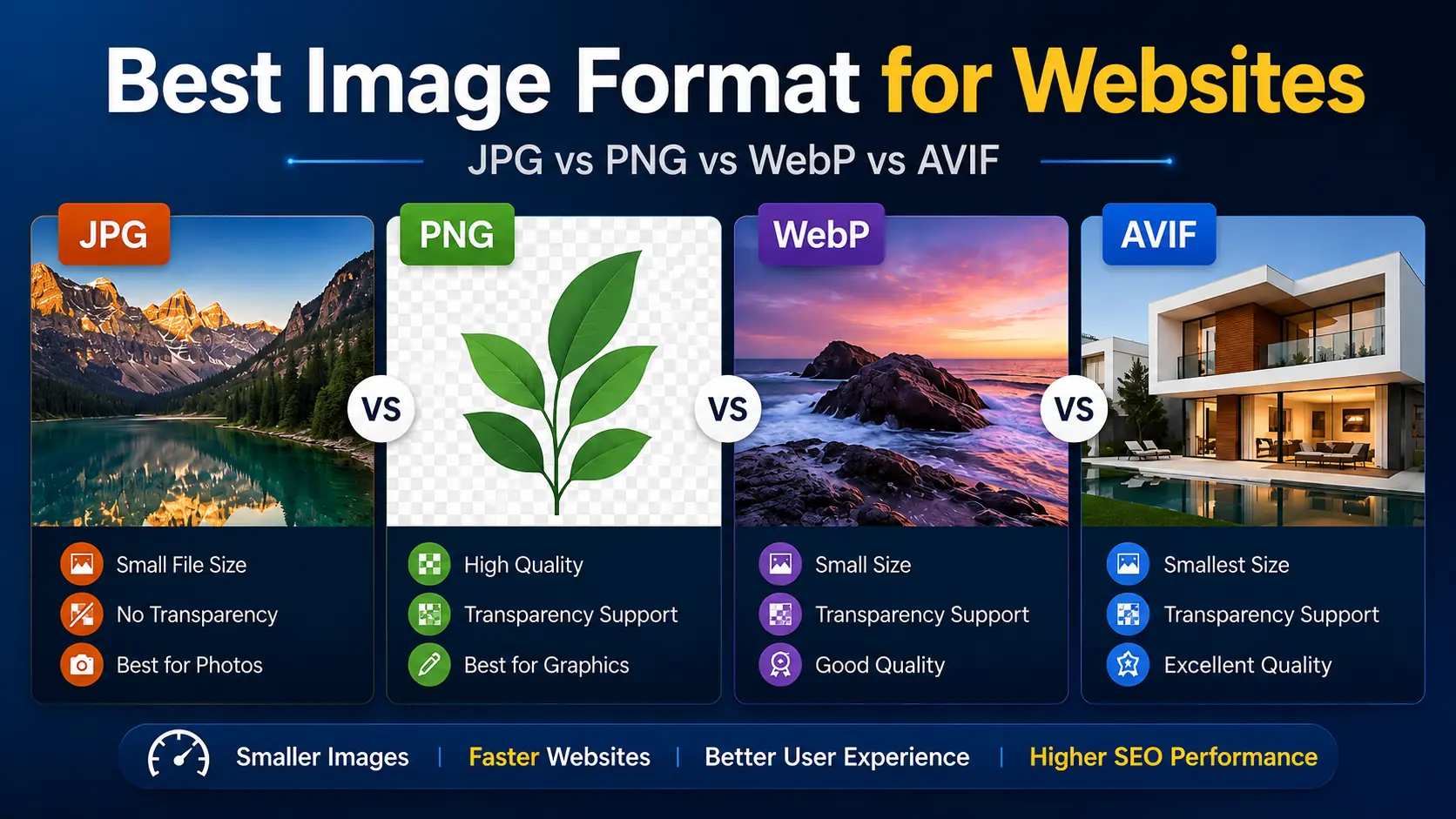
Choosing the best image format for websites is not simply about finding the format with the smallest file size. The right choice depends on the type of image, the quality you need, transparency requirements, compatibility, and how efficiently the image can be delivered to visitors.
For most modern websites, WebP is an excellent default choice because it supports both lossy and lossless compression, transparency, and broad browser compatibility. AVIF can sometimes produce even smaller files at similar visual quality, making it useful when maximum compression matters. JPG remains practical for photographs and compatibility, while PNG is still valuable for lossless graphics and images where preserving exact pixel information matters.
There is no single format that wins every situation. The better approach is to choose the format according to the image.
JPG vs PNG vs WebP vs AVIF: Quick Comparison
Format | Compression | Transparency | Animation | Typical Strength | Best Used For |
JPG/JPEG | Lossy | No | No | Simple, widely compatible photo format | Photos, legacy compatibility |
PNG | Lossless | Yes | No* | Excellent image fidelity and transparency | Graphics, screenshots, transparent assets |
WebP | Lossy & lossless | Yes | Yes | Strong balance of size, quality and compatibility | Most website images |
AVIF | Lossy & lossless capabilities | Yes | Yes | Highly efficient modern compression | Optimized photos, large visual content |
*Standard PNG files are static; APNG is the related format used for animation.
Modern browsers broadly support WebP, and AVIF is also supported across major browsers. Google Search currently supports JPEG, PNG, WebP and AVIF images as well.
That makes both WebP and AVIF realistic choices for production websites rather than experimental formats.
What Makes an Image Format Good for Websites?
The best web image format needs to balance several factors.
File Size
Smaller image files generally require less data to transfer. This can help pages load faster, particularly for visitors on slower connections or mobile networks.
However, format alone does not determine file size.
A 4000 × 3000 WebP image can still be unnecessarily large if the website only displays it at 800 × 600 pixels. Image dimensions, quality settings, compression level and image content all influence the final result.
Visual Quality
Reducing file size is useful only while the image still looks good enough for its purpose.
A product photograph may tolerate some lossy compression without noticeable problems. A screenshot containing small text, on the other hand, can become unpleasant to read if compressed aggressively.
Transparency
Images such as logos, overlays and interface elements sometimes need transparent backgrounds.
PNG is traditionally associated with transparency, but both WebP and AVIF can also represent transparent images.
Compatibility
An efficient image format is not useful if your visitors cannot display it.
WebP now has broad browser support, while AVIF support has also expanded significantly. Still, developers supporting unusual or older browsing environments may choose to provide fallback images using the HTML <picture> element.
JPG: Still Useful for Website Photos
JPEG, usually saved with the .jpg or .jpeg extension, has been one of the standard formats for web photography for decades.
It uses lossy compression. Some image information is discarded during encoding to reduce file size, which works particularly well for photographs containing complex colors, gradients and natural detail.
Advantages of JPG
Excellent compatibility
Suitable for photographs
Easy to create and edit
Supported by virtually every image application and browser
Adjustable compression quality
Disadvantages of JPG
Does not support transparency
Repeated editing and re-encoding can reduce quality
Modern formats can often represent comparable visual quality more efficiently
Poor choice for graphics containing sharp text and flat-color edges
JPG is therefore still useful, especially when compatibility matters, but it is no longer automatically the best final delivery format for a modern website.
If your site already contains a large collection of JPG images, you can test converting a few representative files using the ImgTask JPG to WebP Converter and compare the resulting file size and visible quality.
PNG: Best When Lossless Detail Matters
PNG uses lossless compression, meaning the image can be encoded without discarding the original pixel information through lossy compression.
That makes PNG particularly useful for images such as:
screenshots
diagrams
graphics containing text
interface elements
transparent graphics
images that require precise reproduction
PNG's main disadvantage on websites is file size. Detailed photographic PNG files can become much larger than an appropriately encoded JPG, WebP or AVIF version.
For that reason, saving every website image as PNG simply because it looks sharp is usually inefficient.
WebP and AVIF can also support transparency, so PNG is no longer the only practical option for transparent web graphics. MDN recommends considering modern formats when their compression and features are appropriate.
If you have a large transparent PNG, try converting a copy with the ImgTask PNG to WebP Converter. Check both transparency and visual quality before replacing the original.
WebP: The Best General-Purpose Format for Most Websites
WebP was designed specifically for web images and supports both lossy and lossless compression.
It can also handle transparency and animation, giving it enough flexibility to replace JPG or PNG in many common website situations.
Google's WebP documentation describes it as a modern format designed to produce smaller, richer web images, and current major browsers provide native WebP support.
Why WebP Works Well as a Default
WebP offers a strong combination of:
efficient compression
good image quality
transparency
animation
widespread browser compatibility
flexibility for photography and graphics
For a normal website containing hero photographs, blog images, product photos and thumbnails, WebP is often the easiest modern format to standardize around.
That does not mean every WebP file will automatically be smaller than every JPG or PNG. Encoding settings and image content matter.
Always compare the actual outputs instead of choosing a format based only on its name.
AVIF: Excellent When Maximum Compression Matters
AVIF is a newer image format based on AV1 image encoding.
It supports features expected from a modern web format, including transparency and high-quality image representation, while offering very efficient compression for many types of content.
AVIF can therefore be particularly attractive for large photographs, hero images and image-heavy websites where reducing transferred data matters.
However, there is an important point that is often overlooked:
AVIF will not automatically produce the smallest or best-looking result for every image.
Encoder settings and the source image can significantly affect results. Even format comparisons performed with a single image can produce misleading conclusions, so testing representative images is much more useful than assuming one format always wins.
You can compare your own images using the ImgTask JPG to AVIF Converter or PNG to AVIF Converter.
WebP vs AVIF: Which Should You Use?
For most website owners, WebP is the easier default.
AVIF becomes particularly useful when testing shows that it provides a meaningful file-size improvement without producing unacceptable visual differences.
A practical strategy is:
Choose WebP when:
you want one modern general-purpose web format
compatibility and simple implementation matter
you need transparency
you want an alternative to both JPG and PNG
Choose AVIF when:
reducing image transfer size is especially important
you are optimizing large photographic images
your image pipeline already supports AVIF
your own testing shows a worthwhile improvement
Some websites can use both.
The HTML <picture> element allows a browser to select between different formats. A developer could offer AVIF first, WebP second and another format as a fallback.
<picture>
  <source srcset="hero.avif" type="image/avif">
  <source srcset="hero.webp" type="image/webp">
  <img src="hero.jpg" alt="Example hero image">
</picture>
Browsers evaluate the available sources and use a supported option. This approach is documented by MDN and web.dev for serving alternative image formats.
JPG vs WebP
For photographic website content, WebP is usually worth testing before publishing a JPG directly.
Both can use lossy compression, but WebP was designed with more modern web delivery requirements in mind and can frequently provide an efficient alternative to JPEG.
JPG still makes sense when you need extremely broad compatibility outside the browser, are working with an existing workflow built around JPEG, or simply find that the particular JPG output performs well enough.
PNG vs WebP
This comparison becomes especially important for transparent images.
PNG offers reliable lossless reproduction and is excellent for screenshots and graphics. WebP, however, also supports transparency and lossless encoding while often being more efficient for web delivery.
Do not automatically convert every PNG.
For screenshots containing fine text, UI examples or graphics where exact appearance matters, compare the original PNG and converted WebP carefully before publishing.
What Is the Best Image Format for Website Performance?
There is no format that guarantees a fast website.
Image performance depends on:
image dimensions
file size
compression settings
number of images
responsive image implementation
when images are loaded
how images are delivered
A properly resized and compressed JPG may perform better than a badly optimized AVIF.
Likewise, converting a huge 5000-pixel image to WebP does not solve the problem if the website displays it at only 700 pixels wide.
Format selection should therefore be one part of a broader image optimization workflow.
How to Optimize Images for the Web
How to Reduce Image File Size Without Losing Quality
What Is the Best Image Format for SEO?
There is no special image format that automatically gives a page better Google rankings.
Google Search currently supports BMP, GIF, JPEG, PNG, WebP, SVG and AVIF images. Google also recommends using supported formats and matching the filename extension with the actual image type.
For SEO, choose a format that allows you to deliver useful, high-quality images efficiently.
Then pay attention to the rest of your image implementation, including descriptive alt text where appropriate, useful surrounding content, sensible filenames, image dimensions and overall page performance.
The best image format for SEO is therefore the format that fits the image while supporting a well-optimized page—not simply the newest format available.
A Practical Image Format Strategy
You do not need to choose one format for your entire website.
A simple strategy is:
Use WebP for most website photographs and content images.
Test AVIF for large or frequently viewed images where additional file-size reduction matters.
Keep PNG when lossless graphics or exact screenshot reproduction provides a real benefit.
Use JPG when compatibility or an existing photography workflow makes it the practical option.
Resize images to the dimensions your layout actually needs.
Compare visual quality instead of judging optimization only by file size.
This gives you the benefits of modern image formats without converting files simply for the sake of using something newer.
Test Your Own Images Instead of Relying on Generic Numbers
Compression comparisons on the internet can be useful, but your website's images may behave differently.
A more valuable experiment would be to select several real images from ImgTask and encode each as JPG, PNG where appropriate, WebP and AVIF.
Record:
Test Image | JPG | PNG | WebP | AVIF |
Photograph | 10.62 MB (Original) | 20.77 MB | 2.02 MB | 1.16 MB |
Product image | 2.37 MB (Original) | 5.7 MB | 174.2 KB | 74.8 KB |
Screenshot | 1.23 MB (Original) | 850.7 KB | 119 KB | 58. 8 KB |
Transparent graphic | 403.8 KB | 2.46 MB (Original) | 147.5 KB | 52 KB |
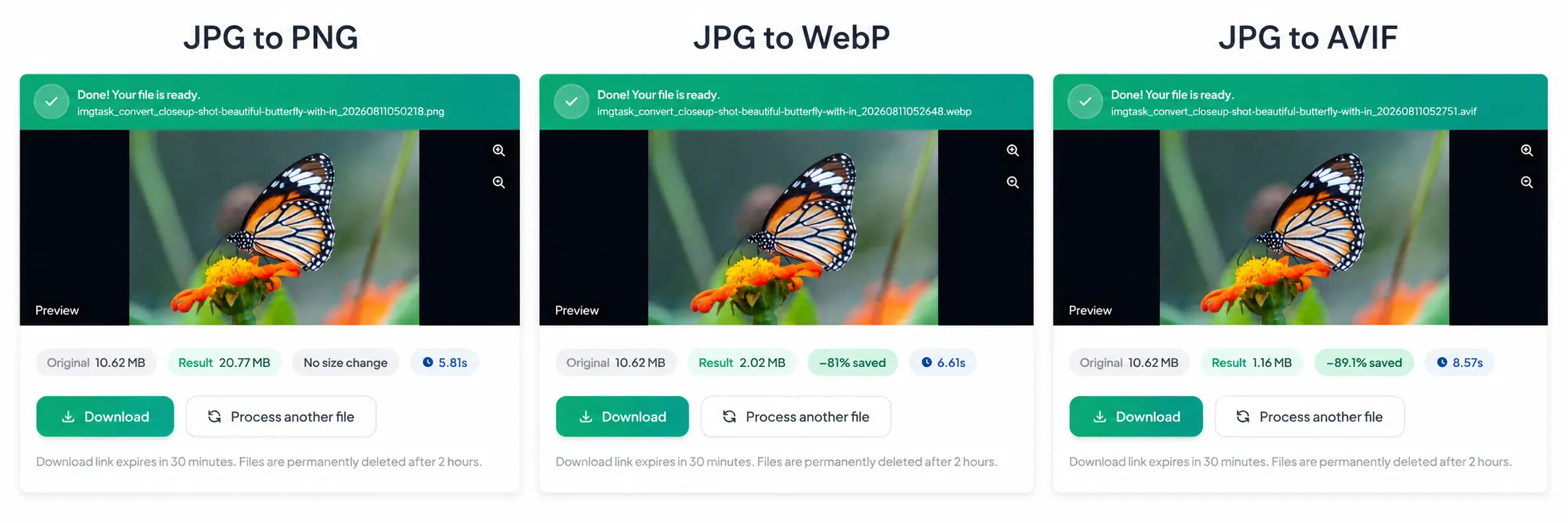
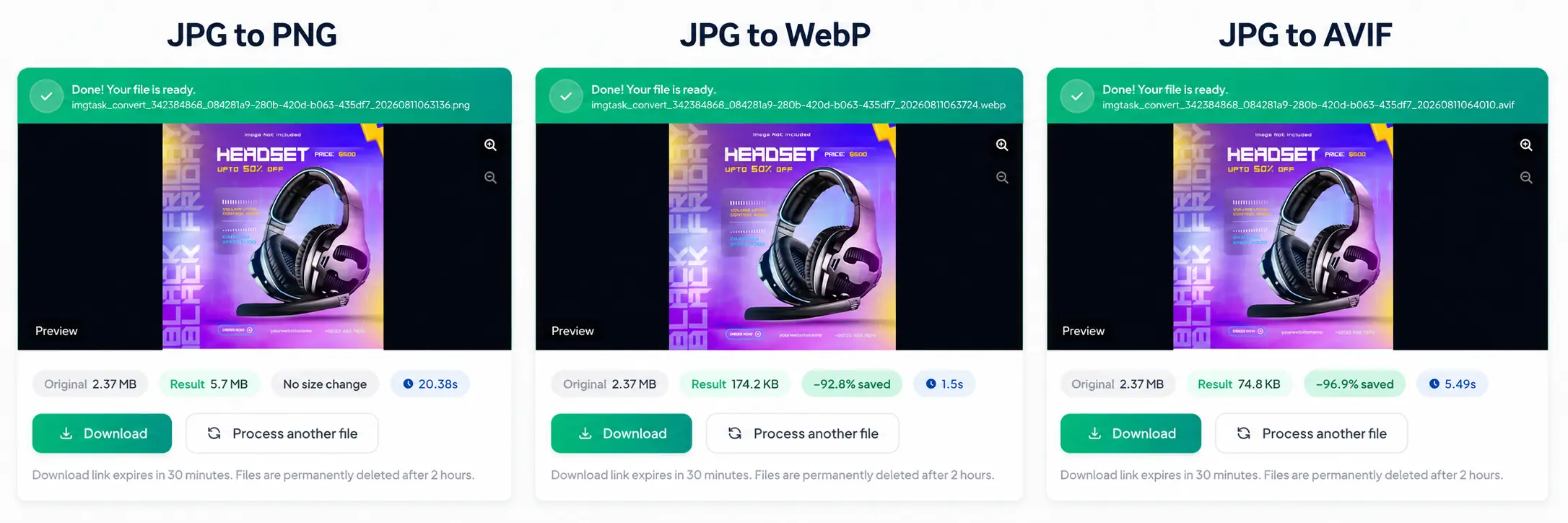
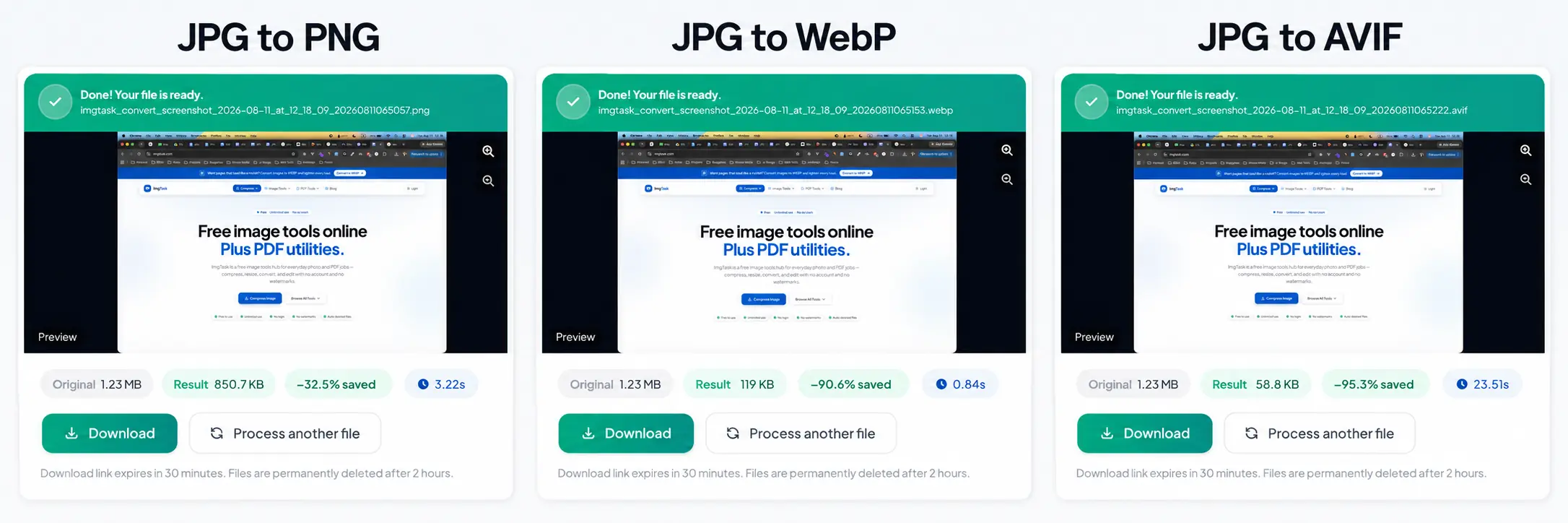
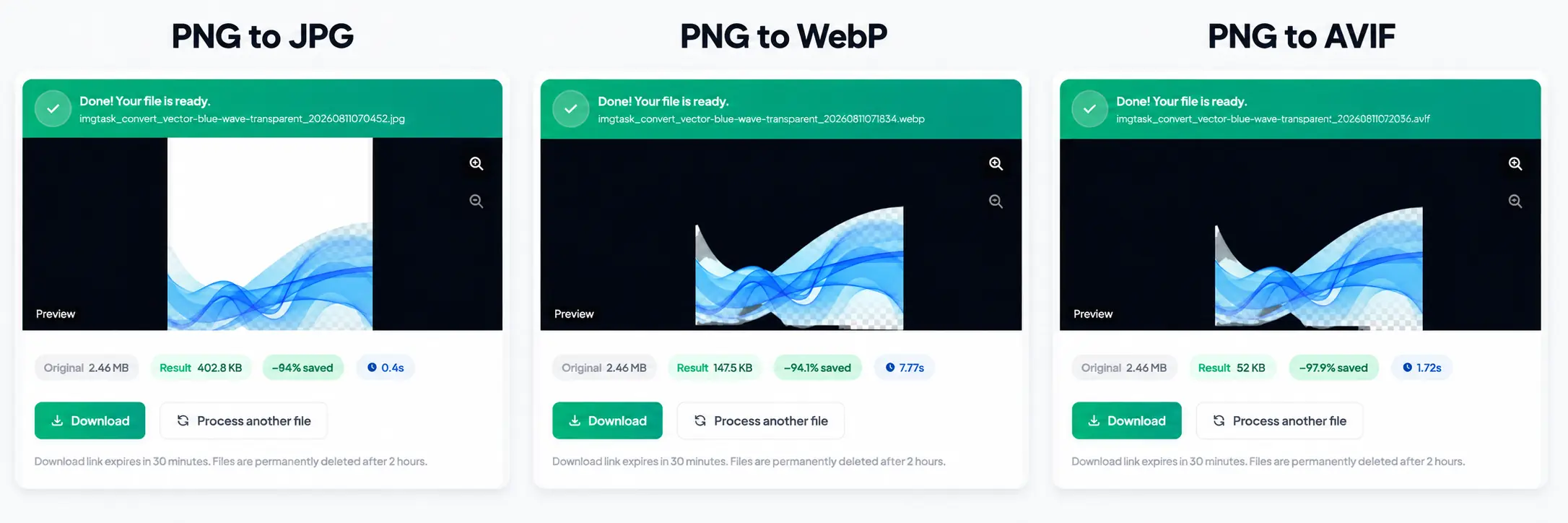
For each test, record the original dimensions, output dimensions, encoding settings and final file size. Then visually inspect the images at their real display size.
That produces much more useful evidence than claiming that one format is always a fixed percentage smaller than another.
Frequently Asked Questions
Is WebP or JPG better for websites?
WebP is generally the stronger modern option for website delivery because it provides efficient compression and additional capabilities such as transparency. JPG remains useful for photography, compatibility and existing workflows.
Is WebP better than PNG?
For many web images, WebP can be more efficient and also supports transparency. PNG remains valuable when lossless reproduction and precise graphical detail are more important than obtaining the smallest possible file.
Is AVIF better than WebP?
Not universally. AVIF can provide excellent compression, but results depend on the source image and encoding settings. WebP offers an especially convenient balance of compression, quality and compatibility. Test both when image size is important.
Should I convert every website image to WebP?
No. WebP is a good default, but format should match the content. Screenshots, graphics, photographs and transparent images can behave differently after conversion.
Does Google index WebP and AVIF images?
Yes. Google Search currently lists both WebP and AVIF among its supported image formats.
Does changing JPG to WebP reduce image dimensions?
No. Conversion and resizing are different processes.
Converting JPG to WebP changes the file format. Resizing changes the image's width and height in pixels. Depending on the tool and settings, a converted image can keep exactly the same pixel dimensions while having a different file size.
Which Image Format Should You Choose?
For most modern websites, start with WebP. It provides a practical balance between image quality, file size, transparency support and browser compatibility.
Use AVIF when testing shows a worthwhile improvement, keep PNG for graphics that genuinely benefit from lossless reproduction, and use JPG when its compatibility or photography workflow makes it the most practical choice.
If your existing images are JPG or PNG, try converting a representative sample with ImgTask before changing your entire image library. Compare file size and visual quality, then choose the format based on the actual result.
The team
Written by
Dinitha Ransidu
authorKeep reading
Related articles

How to Create a QR Code: A Complete Guide for URLs, WiFi and More
Dinitha Ransidu
August 27, 2026 17 min read
How to Reduce Image File Size Without Losing Quality
Dinitha Ransidu
August 2, 2026 13 min read
How to Optimize Images for a Website: The Complete Guide
Dinitha Ransidu
August 1, 2026 20 min read